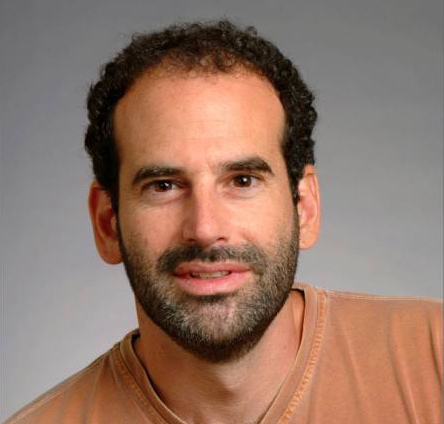
Professor Seth Teller
On July 1st, our leader, colleague, and friend Professor Seth Teller passed away. MIT News has an appreciation of Seth's life and work. If you would like to share your thoughts, stories, and pictures of Seth, please send them to rememberingseth [at] csail.mit.edu and they will be shared with his family and posted online at a later date. Please indicate whether you'd prefer your thoughts to be shared anonymously. Our thoughts are with his family at this difficult time.
Seth Teller (MIT EECS Dept. / CS & AI
Laboratory)

We develop robots that can share people's goals, and
effectively do their bidding, in a variety of environments.
"Robots undoubtedly capture the imagination, but that alone
does not justify an investment in robotics," said DARPA Acting
Director Kaigham J. Gabriel.
"For robots to be useful ... they need to offer gains in either
physical protection or productivity. The most
successful and useful robots would do both via
natural interaction with humans in shared
environments."
Our group develops autonomous mobile robots that have natural
interfaces, and sufficiently rich situational awareness to perform
useful low-level and high-level tasks (like fetching, delivery,
wheelchair transport, driving, forklift operation, reaching and object
grasping, tool use) for and in cooperation with people. Additionally,
we develop situationally aware hand-held or body-worn devices that
assist people (both with and without disabilities)
with everyday tasks. We use color cameras, depth cameras and lidars
as primary sensors, and plentiful I/O bandwidth, storage capacity, and
CPU resources to support representation-building, inference, planning
and action.
Here are my
publications
and a brief summary of my current
research and teaching
activities. And of course the obligatory
inspirational quotes (below):
Nothing will ever be attempted, if all possible objections must be
first overcome.
- Samuel Johnson, 1759.
The perfect is the enemy of the good.
- Voltaire, 1772 (though presumably he said it in French).
I am a member of the RVSN (Robotics,
Vision, and Sensor Networks) Group,
a Professor of Computer Science and Engineering in
the EECS department,
and a Principal Investigator (PI) in the
Computer Science and Artificial Intelligence Lab
(CSAIL),
both of which are part of the School of Engineering
at MIT.
Contact
Information and Maps
Publications (And citations)
New Stuff
NEW! MIT is competing in the
2012-14 DARPA Robotics Challenge, to develop semi-autonomous robots
that can help with disaster relief. See our
team page.
UPDATE (13 May 2013): DARPA notified us today that we have
qualified to compete in the upcoming "VRC" in June 2013.
UPDATE (21 Dec 2013): We placed in the top eight at the DRC
Trials in Homestead, FL, which secures us a berth in the Finals,
anticipated to be held in May or June 2015 in a location TBD.
NEW! In early 2012,
we received a major gift from the
Andrea Bocelli Foundation
in support of our work to develop assistive technology for blind and
visually impaired people.
NEW! Here is a brief
summary of my current
research and teaching
activities.
NEW! This term I'm
developing and teaching (with Prof. Rob Miller) a subject on
Assistive Technology
for people with disabilities.
NEW! Here are slides
from a June 2011
group meeting
tieing together various research directions in our group.
NEW! Here are my
slides
from the 2011 CSAIL UROP recruiting session.
NEW! Watch my December 2010
seminar about our
work to develop robots that can join human teams.
NEW! Here are some
video highlights
from our June 2010 demonstration of an unmanned robot forklift.
(See also this
visualization
of its sensor data and internal plans as it approaches and manipulates
pallets.)
See also this demonstration of
spoken command of the unmanned forklift. (The command is recognized
using the Summit system, created by Jim Glass and the CSAIL Spoken
Language Systems Group. Then a semantic structure is automatically
extracted from the command, and used to create the graphical model
that appears in the left. The system performs inference in the
model to find an action sequence corresponding to the command, then
executes that action sequence. The robot has previously been given
a tour of the environment, so that it knows where the different pallets
are, and where the truck is; it uses that information to infer groundings
for the various semantic elements of the spoken command.)
NEW! Particle Video source code
available here!
NEW! In May 2009 I delivered the
Jacques Morgenstern Colloquium to an audience at INRIA. The subject of
my talk was MIT's participation in the DARPA Urban Challenge; the video
and slides are posted
here!
NEW! In spring 2008 we began a
multi-year project to develop a
robotic forklift!
NEW! Quotes from students taking 6.141:
(Spring 2010) "It is an excellent class. Every course 6 student should want to take
it. It combines programming, robotics, and electrical engineering."
(Spring 2009) "Looking back, it is truly amazing how much I have learned this
semester. I can honestly say that I have learned more from this class than any
other that I have taken in my MIT career. ... [T]he knowledge I gained
in this class has truly prepared me for what I may do in life after MIT."
(Spring 2009) "This class has taught me a lot. Not only has it been
my first real class on robotics, it was my first real lab class and my
first group project class. The experience has been fun and challenging
and has inspired me to seek a career in robotics."
(Spring 2008) "[T]hings are working out well now, and I feel like
the course changed the way I think about systems."
(Spring 2008) "Overall, I thoroughly enjoyed this course. It was the
only course I was taking that I didn't need in order to
graduate, and yet I spent by far the most time on it."
(Spring 2008) "Thanks so much for giving me one of my best experiences at MIT!"
(Spring 2008) "[T]his was an amazing class, and I want to thank both of you,
along with the rest of the staff, for making this one of the best
classes I've ever taken."
NEW! In May 2006 we formed
a team to compete in the
DARPA Urban
Challenge, the goal of which is to develop passenger vehicles
capable of safe, autonomous driving in urban traffic.
In Spring 2006 I taught a new "grand
challenge" course, Robotics: Science
and Systems I. This is the first term of a two-term sequence
intended for Juniors in EECS, Aero/Astro, and MechEng. It can be used
as an Institute Lab or as an EECS Department Lab.
RSS I carries 12 EDPs (Engineering Design Points).
In Fall 2006 we have focused
RSS II
on the DARPA Urban Challenge, adding a graduate component 6.897 to
the subject.
(MIT Catalog listing
for RSS I;
for RSS II;
and the Spring '08 RSS I Website.)
NOTE that as of January 1, 2009 I am no longer the
EECS Area II Chair, overseeing the Area II Graduate Program. The new
chair is Prof. Randy Davis; to write him in his capacity as chair, use
area2-chair@csail.mit.edu
from a *.mit.edu email address (to avoid spam filtering). Thanks.
Here is a reasonably comprehensive list of my group's
research projects.
Since 1994 I've been on the EECS faculty here at MIT. From 1993-94,
I was a postdoc in computer graphics and computational geometry at Princeton,
working mostly with Pat Hanrahan, Peter Schroder and Tom Funkhouser.
The year before that, I postdoc'ed at the Hebrew University Givat Ram campus
in Jerusalem. From 1987-92, I was at UC Berkeley, completing a PhD on rapid
visibility computations advised by Carlo Séquin.
During much of that time, I was a member of SGI's
Advanced Graphics and Research & Development groups. Before graduate
school I worked for a few years at a Boston company called Camex which
built one of the first desktop publishing systems (including 2000 DPI laser
phototypesetters which produced gorgeous paper & film output).
My undergraduate work was in Physics, at Wesleyan, where I was also a
lab assistant and TA. I've also worked as a paperboy, a short-order
cook, a gardener, a mechanic, and a tutor of suburban and city
kids. Sources of literary/artistic/general inspiration include Charles
Dodgson (Lewis Carroll), George Herriman (Krazy Kat, Ignatz Mouse,
Offissa Pupp), Winsor McCay (Little Nemo), Don Marquis (Archy and
Mehitabel), Rickie Lee Jones, Roddy Doyle, Luc Besson, Bjork, Arthur
Ganson, Andrew Goldsworthy, and James Gleick.
My first academic loves were math and geometry. Later I got
into physics, and through physics, numerical simulation. From there,
desiring to see the outputs of my computations, I got into computer
graphics and visualization. In graduate school Raimund
Seidel inspired me to learn computational geometry, a (relatively)
new branch of computer science which combines geometry, theory, and
algorithms.
More recently I've been studying (and developing new techniques for)
robust, large-scale computer vision, to support fine-grained human and
robotic mapping and localization. I'm also working to develop wearable
and hand-held devices to support direct interaction with the world.
Those activities led me to robotics and the study of representations,
algorithms, and devices that maintain situational awareness -- a
"mental map" of the world -- used to perform useful tasks under human
direction. Among the most compelling applications include assistive
technology for people with motor, perceptual or cognitive disabilities.
My group page has more
information about various projects we're pursuing.
Teaching
Fall 2011,
6.S196/PPAT,
Principles and Practice of Assistive Technology for people with disabilities.
Spring 2011, sabbatical.
Fall 2010, sabbatical.
Spring 2010, 6.141.
Fall 2009, 6.142.
Spring 2009, 6.141.
Fall 2008, 6.142.
Spring 2008, 6.141.
Fall 2007, 6.01.
Spring 2007, 6.141.
Fall 2006 (w/ Nick Roy and Daniela Rus),
Robotics:
Science and Systems II, Lecture F 10-12pm in
MIT 33-419,
Lab TR 2-4pm in
MIT Gelb Lab.
Spring 2006 (w/ Nick Roy, Una-May O'Reilly, and Daniela Rus),
Robotics:
Science and Systems I, Lecture MWF 2-3pm in
MIT 32-144,
Lab TR 2-4pm in
MIT Gelb Lab.
Fall 2005 (w/ John Leonard, Nick Roy, Una-May O'Reilly, and Daniela Rus),
Robotics:
Science and Systems II, Lecture MWF 11-12pm in
MIT 32-144,
Lab TR 230-430pm in
MIT Gelb Lab.
Spring 2005 (w/ John Leonard, Nick Roy, Una-May O'Reilly, and Daniela Rus),
Robotics:
Science and Systems I, Lecture MWF 1-2pm in
MIT 2-139,
Lab TR 230-430pm in
MIT Gelb Lab.
Fall 2004,
6.001: Structure and
Interpretation of Computer Programming, Recitations TR 10-11am in
MIT 26-328.
Also curriculum development for RSS (see above).
Spring 2004, sabbatical
Fall 2003, sabbatical
Fall 2002 (w/ Prof. Durand),
6.837
(Introduction to Computer Graphics), TR 230-4pm in MIT 4-163.
Spring 2002, 6.033 (Computer
Systems Engineering), (MIT/EECS
Catalog Listing),
MW(F) 2-3pm in 34-101.
Fall 2001 (w/ Prof. Indyk), 6.838
Geometric Computation, (MIT/EECS
Catalog Listing),
TR 1-230pm in 4-237 (Electronic Classroom).
IAP 2000-01, I sponsored a course taught by Ronen Barzel of Pixar,
entitled Physically-Based Modeling for Computer
Graphics Animation, TWR 1030-noon in MIT 4-035.
The course will have intensive lecture and laboratory components.
Fall 2000 (w/ Prof. Sudan), 6.046
(Introduction to Algorithms), MW 930-11am in MIT 2-190
Recitation: F9 (26-314); F10 (26-314); F11 (36-839);
F12 (36-156); F1 (36-156); F2 (36-156).
Fall 1999, 6.837
(Introduction to Computer Graphics), TR 230-4pm in MIT 4-370.
Spring 1999, 6.033 (Computer
Systems Engineering), Recitations TR 1-3pm in MIT 36-153.
Fall 1998, 6.837
(Introduction to Computer Graphics), TR 230-4pm in MIT 1-190
(w/ Prof. McMillan).
Spring 1998, 6.838
(Interactive Geometric Data Structures and Computation), TR 230-4pm
in MIT 3-133.
Fall 1997, 6.837
(Introduction to Computer Graphics), TR 230-4pm in MIT 3-270.
Spring 1997, 6.838
(Advanced Topics in Computer Graphics), MW 3-430pm in MIT 3-133
(w/ Prof. Dorsey).
Fall 1996, 6.837
(Introduction to Computer Graphics), TR 230-4pm in MIT 3-270.
Spring 1996, 6.046
(Introduction to Algorithms), TR 230-4pm in MIT 2-190.
Fall 1995, 6.837 (Introduction to Computer
Graphics), MWF 1-2pm in MIT E25-111.
Spring 1995, Curriculum development for 6.046 and 6.837.
Fall 1994, 6.001
(Struct. & Interp. of Comp. Prog.), MWF 12-1, 1-2pm in MIT 13-4101.
Project Athena maintains a great
set of electronic classrooms
with networked machines and projection displays. Also, there are (PDF)
floorplans
available for all MIT rooms.
Implementations & Data
Here are some useful computational
geometry codes.
Also, several large and/or interesting geometric
datasets, including the Berkeley Soda Hall model (a report on the software
infrastructure as ported to MIT is available here,
also as postscript).
Long ago, I wrote psgl, which enables
SGI GL4 programs to generate postscript output. Others
have since made many improvements,
culminating in GLP
which enables OpenGL postcript output.
Here is Kurt Akeley's 1991 demonstration of hardware-assisted solid
capping with stencil planes.
Here is C code (written by Peter Shafton of SGI) for a software
tranaglyph.
Other Pursuits
Have you ever heard of words that are
their own antonyms ? Here are some.
Here is a collection of (potentially valuable or life-saving)
random ideas.
Here is how to unlock a locked Word document
(or unprotect a protected Word document).
When the ground isn't completely frozen (and, at times, even when it
is), I play ultimate
frisbee.
Long ago, I was a decent bowler (ten-pin, not those ridiculous
candlesticks);
my lifetime high score (from 1995) is 251
(yes, I did scan the score sheet... pathetic).
A few years ago, I bought a house, and
got frustrated when the lending representatives were unable to explain
how they had arrived at particular mortgage payments
(all they could do was table lookups). I was curious about how the
amount of the fixed monthly payment is determined, and how it gets partitioned into principal and interest,
so I derived it directly
(Latex source here).
Here's some C code to produce amortization
tables for any loan amount and duration; it also allows arbitrary supplemental
payments during the payback period.
Do you use the GUI program ical ? One problem with it is that from the
command line, though you can list your appointments, you can't add appointments.
Here is a
small stand-alone C program called "addappt"
for adding ical appointments.
In February 2000 I bought a gas-electric hybrid vehicle, the Honda Insight, and I really like it
! Mine was apparently the 261st
to roll off the assembly line (Honda made about 4,000 of them that
year).
Have you committed to be a local arrangements chair for a workshop
or large conference? My condolences. I just went through this
for IPSN 2007 at
MIT, and have learned
a lot that other LACs might find useful in future.
A fun activity: print this fold-and-cut snowflake pattern to
ordinary 8.5x11 paper, then follow the instructions to produce an
equilateral triangle six layers thick. Next, cut notches or shapes out
of that however you wish; what's left will unfold into a snowflake shape.
Finally, I enjoy shrinking my friends (like
Rob Myers) -- no computers were used to make this picture !
Do you hate forced
commercials (DVD content you can't skip), especially on kids' DVDs? Join me in a class-action lawsuit against the DVD creators and manufacturers of DVD players.
_
Ouch! 183,414,017
hits since fall 1993.


