Your First Chromium Run
Your first Chromium run will be something quite simple. One of the
programs built during the compile of the Chromium system is called "fonttest" -
you can go ahead and run it now. If everything is OK, you should see a
window appear with a text message in it. This window is using the system's
OpenGL - nothing Chromium-related has happened yet. To run this program
using Chromium, you will need to follow these three steps (you'll need three
shell windows open):
- Components of any Chromium run will need to know what they are supposed to be
doing. They get this information from the configuration mothership.
The mothership is controlled by scripts written in the Python
programming language. One such script is located in
cr/mothership/configs/crdemo.conf.
NOTE: You must edit this file to point at the directory containing
binaries for Chromium.
I personally install things in a directory called
"C:\work", so if you installed things somewhere else, you need to
edit the value of CR_BIN_DIR at the top of the file. No other changes to the file should be necessary.
Now change to the cr/mothership/configs directory, and type:
python crdemo.conf fonttest
The mothership will now be running, and you should see a message to that
effect.
- In another window, start the Chromium server. From any
directory, run
crserver
That's all there is to it. The Chromium server will configure itself
by asking questions to the mothership that you ran in step 1. You
should see a blank window appear on your screen. This window was
created by the "Chromium Render SPU", which was loaded by the
server. This SPU will dispatch the incoming stream of commands to your
system's OpenGL implementation. Unfortunately, in Microsoft Windows,
the created window doesn't listen to events, so you can't move it around or
bring it to the front, which can be pretty annoying. This will be
fixed in a later release.
- In a third window, start the Chromium "application
faker". This is a loader program that will start another
unmodified application and make sure that it finds the Chromium
OpenGL shared library instead of the system's. From any
directory, run
crappfaker
Again, the faker (and the OpenGL DLL, and the SPU's loaded by the OpenGL
DLL) will all configure themselves by asking questions of the mothership
started in step 1.
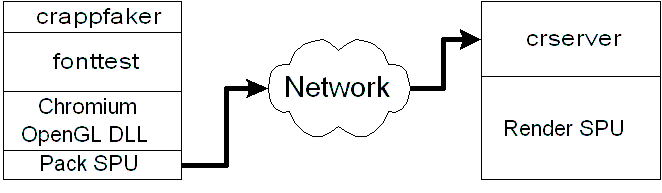
Once you run the application faker, you should get another blank window, and
the text rendering should appear in the (previously blank) window from step
2. The blank window belongs to the fonttest
program started by the application faker. As far as
fonttest knows, it is rendering to the blank
window. The Chromium OpenGL DLL intercepts all of fonttest's calls to OpenGL and sends
them over the network (in this case, a TCP/IP connection to your local machine)
to the Chromium server, where they are dispatched to the system.
The
Chromium run you have just done corresponds to the following graph of
nodes: