Epson 3800: Printer Notes and Resources
This page is maintained by Eric Chan
Last updated: March 23, 2011
The purpose of this page is to help photographers who are
considering purchasing the Epson 3800 and also to help existing 3800
users get the most from this printer.
If you have tips to contribute or have questions not covered here,
please let me know!
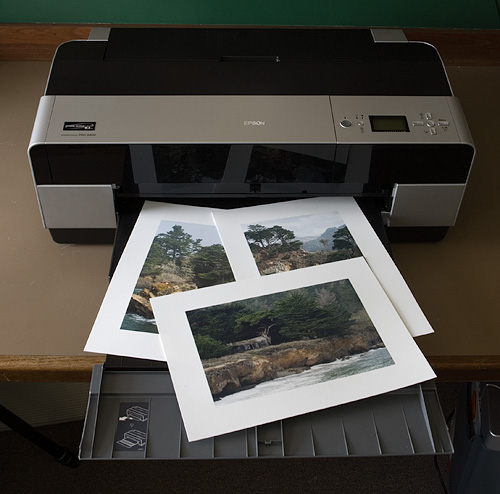
Point Lobos portfolio prints
on Epson Velvet Fine Art paper
News and Notes
- March 23, 2011 I have created ABW profiles for
Canson Infinity Platine Fibre Rag, for both the Epson 3800 and Epson 3880 printers.
Enjoy!
- April 12, 2010 I have created ABW profiles for
Canson Infinity Baryta Photographique and Hahnemühle Fine
Art Pearl, for both the Epson
3800 and Epson
3880 printers. Thanks to W. Walker and L. Watson for
providing paper samples.
- February 21, 2010 I have added Epson 3880 ABW profiles for
Crane Museo Silver Rag to the 3880 ABW profiles page. Thanks
to A. Goldhammer for submitting the paper samples.
- February 13, 2010 I have begun building ABW profiles for the Epson
3880 printer. Due to the different ink sets, screening
technology, and driver behavior between the 3800 and 3880, ABW
profiles for these two printers are necessarily different: that
is, an ABW profile for one printer will generally not work well
for the other. For now, I just have a handful ready for the 3880
(not nearly as many as I do for the 3800), but over time I hope
to expand the list.
- December 28, 2009 I have
added ABW profiles for the Epson Hot
Press Bright and PremierArt Generations Alise Bright White
papers to my ABW profiles page for the Epson 3800.
- September 13, 2009 I have
added ABW profiles for Crane Museo
Silver Rag and Inkpress Baryta Warm Tone to the ABW
profiles page. Thanks to A. Goldhammer and N. Goodman for submitting the paper
samples.
- September 1, 2009 Epson has announced the Epson
Stylus Pro 3880, the follow-up model to the Epson 3800.
As I recall, the original 3800 shipped in early September 2006, so
it is fitting and expected that a successor would appear three full
years later.
Not surprisingly, the 3880 looks rather similar to the 3800. I believe
that, in design and operation, it is very much the same. The primary
differences are in the internals: (1) the adoption of the UltraChrome
K3 with Vivid Magenta inks (whereas the 3800 used the UltraChrome K3
-- no Vivid Magenta), and (2) newer screening technology. I am
actually more interested in the latter. I have seen the results from
other Epson models that possess this newer tech (like the R2880) and
found them superior to what the original 3800 could produce on Photo
Black-compatible papers, particularly in saturated yellow-green areas
and red-magenta areas.
- June 20, 2009 I have
added an ABW profile for Ilford
Smooth Pearl to the ABW
profiles page. Thanks to R. Graham for submitting the paper
samples.
- May 16, 2009 I added two new entries to the FAQ.
- February 7, 2009 In response to common requests
from fellow photographers, I have added some new (and long
overdue!) material to my step-by-step workflow guide,
namely:
- January 10, 2009 I have added an ABW profile for Hahnemühle Photo
Rag Bright White 310 to the ABW profiles page. Thanks to M.
Clayton for the paper samples.
- November 20, 2008 I have updated my step-to-step printing workflow
tutorial with some tips on
display calibration and a better approach for
printing to the Epson ABW driver when dedicated ABW profiles
aren't available. I have also added some references to
Photoshop CS4 and Lightroom where appropriate. (Thanks to Jeff
Schewe for the tip about printing "via sRGB" from
Lightroom.)
- November 11, 2008 Due to popular demand, I have
added ABW profiles for Epson Premium
Luster and Hahnemühle Photo Rag Baryta 315 to the ABW
profiles page.
- August 30, 2008 I have added ABW profiles for Epson UltraSmooth Fine
Art 325 and Innova Soft White Cotton 280 to the ABW profiles
page. Thanks to C. Meylan for the Innova samples.
- August 16, 2008 I have added ABW profiles for Hahnemühle Fine
Art Baryta 325 and Hahnemühle William Turner to the ABW
profiles page. Thanks to P. Shankar and G. DeWolfe for
supplying paper samples.
Mark D. Segal has written
an article about 3800 ink costs. Mark finds that ink overhead
(i.e., ink used for maintenance and other non-printing tasks) is about
20% of ink used for prints. To quote directly from the article,
"Hence on average, the cost of ink for a print should be multiplied
by about 1.2 to take account of losses."
I originally estimated (much less carefully than Mark) around 2 mL of
total ink used per square foot of printed area. Mark is finding ink
usage to be roughly 1.7 mL of total ink used for the same area (I'm
deriving this number from his non-Yellowstone data). Once you multiply
1.7 by 1.2 (the overhead factor), you get pretty close to 2 mL per
square foot.
- January 19, 2008 I have added ABW profiles for
Hahnemühle Photo Rag Pearl 320 and Ilford Gold Fibre Silk 310 to
the ABW profiles page.
- November 11, 2007 I have added a 3800 ABW gray profile
for Epson Exhibition Fiber to my ABW profiles page.
I have done some preliminary testing of Epson Exhibition Fiber
(EEF) on letter-sized sample sheets on my 3800 with the K3 inks. D-max is about
2.2 when
printing with the standard RGB color driver and jumps up to 2.5
when printing with the ABW driver. In both cases I used the
Premium Luster Media Type and 2880 dpi. Additional density could
probably be achieved with the RGB driver by increasing the Color
Density to +10, but I did not try this.
Appearance-wise, EEF reminds me very closely of Innova
FibaPrint Ultra
Smooth Gloss 285.
The paper white and surface characteristics are nearly
indistinguishable. However, EEF has a slightly thicker
base -- a good thing in my book. It's also possible that EEF has a
different coating (not sure about this).
I compared EEF closely to Harman Gloss FB Al, another recent
fiber inkjet paper. EEF has a slightly cooler and brighter base
than HG. Thus when placed side by side, EEF looks whiter and HG is
warmer and dimmer. HG's surface is noticeably smoother,
leading to a more pronounced gloss effect. In contrast, EEF's surface
has a bit more texture or tooth to it, breaking up the mirror-like
gloss effect. Fortunately, EEF does not have the "sparkly" or "pebbly"
effect of luster papers such as Premium Luster. EEF is ever so
slightly thicker than HG; I have no trouble feeding either EEF or HG
through the Auto Sheet Feed, but I do so one sheet at a time (to
prevent misfeeds). In terms of surface characteristics and
hand-feel, I don't currently have a strong preference one way or
another. In practice, I think it would boil down to the image in
question.
Printing quality between the two is very similar: outstanding. A
significant
characteristic of HG is how tightly it holds the ink drops: it
has a very tight dot pattern which preserves super-fine detail better
than any other inkjet paper I've tried (with perhaps the exception of
Pictorico High-Gloss White Film). Very sharp. EEF is not quite as
sharp as HG, but close. Whether the difference is due to the Baryta
layer in the HG, I have no idea.
But there's a tradeoff, which is that for small prints
which are viewed up close, the dot pattern on the HG
is more easily discernible to the naked eye. In other
words, smooth areas on HG can be very slightly grainy,
more so for color prints than for B&W. In comparison,
these flat areas on EF appear very smooth.
The EEF and HG papers are very close when it comes to gloss
differential. These are probably the best two on the market I've yet
seen in terms of minimal gloss differential when used with the K3
pigment inks, especially for B&W prints. For color the gloss
differential is more noticeable, but these two papers are still better
than the rest. The new Vivid Magenta inks are supposed to help reduce
gloss differential even more, but by how much I cannot say (I haven't
done a personal comparison).
An important note: the Epson info sheet that came with the EEF samples
suggests using the Front Feed to load the paper on the 3800. Don't
do this!! The print head ends up too far from the paper surface,
so the ink dots misregister and end up causing a "ghosting" image
— very fuzzy. If you would like to use the Front Feed (e.g., to
avoid pizza wheel marks entirely) then
try
this method described here.
- October 8, 2007 There is a new paper from
Epson called Exhibition Fiber. It is Epson's first entry in the F
surface inkjet paper market and is planned for release in
November. Click
here to read a preview by Michael
Reichmann. I look forward to trying this paper with the
3800.
I have written a page describing my current favorite papers for
the Epson 3800.
Instead of using gray curves when printing with the ABW driver,
I have now moved on to building and using
standard ICC profiles for the ABW driver. The new method retains
all the benefits of the older gray curve approach described on this
page, shares the same workflow as when printing color images, and
can be used from all printing applications (such as Lightroom),
not just Photoshop.
I have written some notes and example
plots on color gamuts.
- October 1, 2007 The Epson Europe site has version
6.5a of
the Epson 3800 driver for Windows. The main thing I've seen so
far is an updated interface; I don't know yet if there are any
quality changes yet (i.e., if existing ICC profiles get
invalidated). If you do install the new driver, be aware that existing
saved
driver settings do not appear to be compatible with the new
driver! The new driver does allow one to create and save
commonly-used settings, but you have to start from scratch. The
new driver settings also include the paper size (whereas the
older drivers did not), so you'll need a separate driver setting
for each paper size. (I'm not convinced yet that this is a good
thing.)
Note that if you print from Lightroom, the new driver may also
invalidate your existing Lightroom printing presets.
At this point I don't see any practical reason to update to
driver version 6.5a.
- April 22, 2007 I have written an article that
provides step-by-step instructions for printing color and B&W
images on the Epson 3800. The article also contains tips for
display
calibration and soft-proofing. This is practical how-to article;
it doesn't really cover the theory. I hope the article will help
new 3800 users achieve better screen-to-print matches. The
advice given in the article should also help photographers who
own different printers, though the exact steps may differ
somewhat.
- April 21, 2007 I updated the article on
reading big profile targets with the
following note: when reading targets in MeasureTool in the
"Strip with Gaps" mode, you must read each strip
from
left-to-right only, not right-to-left.
Otherwise, the measurements will be reversed and you'll end up
with a bogus profile.
- April 14, 2007 I have added ABW gray curves for
five Red River papers to
the papers page: UltraPro Gloss,
UltraPro Satin, Aurora Art White, Aurora Art Natural, and Dourian Art.
- April 4, 2007 I have written a new article that
explains how to build printer profiles in MonacoPROFILER using
measurement data obtained in MeasureTool (e.g., with an Eye-One
Pro). I have provided a free Windows-only program called ConvertToMonacoLAB
which performs the required measurement conversion. Bill
Atkinson
provides a similar Mac-only program.
- March 27, 2007 Added ABW gray curves for three
papers: Epson Ultra Premium Presentation
Paper Matte (formerly Enhanced Matte), Innova FibaPrint White Gloss (F-Type),
and Moab Entrada Fine Art
Natural.
- March 23, 2007 I have been experimenting with building my own gray
curves for printing black and white images the ABW driver. These
paper-specific curves are designed to reproduce tones accurately
throughout the entire range from shadows to highlights. They also
provide a way to soft proof images (at least for judging tonal
relationships). Things are still in the experimental stage, and I've
only done a few tests so far (about 20 prints), but the results are
pretty good.
I've written an article explaining the
process and have made my gray curves freely
available on this page. There are only a few curves right now, but
I plan to add more as I work with more papers. If you would like to
obtain curves for specific papers that I haven't tried yet, let me know and perhaps we
can work something out.
Note that there are many other black and white printing solutions,
including Roy Harrington's excellent QuadToneRIP, which offers a
much higher degree of control and flexibility (Roy recently added
Epson 3800 driver support to QTR). On the other hand, the gray curves
described here might come in handy if you prefer to print from
Photoshop (instead of a separate application) or use the ABW driver
(instead of the color RGB driver).
- March 21, 2007 Ethernet
Port Firmware Update v1.01 has been posted to the Epson USA
support site. According to the release notes: This update allows
you to correctly reset the printer after a print job is canceled when
using the Ethernet connection. To apply this firmware update, please
use the Remote Panel Utility or the Firmware Update selection in the
EpsonNet Config Utility, also downloadable from this page.
Note that this is an ethernet port firmware update only -- not a
general printer firmware update.
- March 7, 2007 Welcome to my Epson 3800 tips and resources page! It's taken a
while to put it together, and I hope it will help both prospective and
existing 3800 users.
Firmware
Software Driver
- The latest driver version for Mac OS X (Leopard) is available
from the Epson USA support site.
The driver version number is 3.57 for Tiger and 6.11 for Leopard.
- The latest driver version for Windows is 6.50 and is
available from the Epson USA support site.
Resources and Articles
External Articles
Forums
Home
|